Meet the Keeper. It knows your building.
OB1 Resident is the app for people who live in a building run on OB1. Ask the Keeper about the rules, moving in or the bins. Tell it what's broken, or just tell Siri. Then watch it get sorted.
The screens on this page are the real app, showing a made-up sample building.
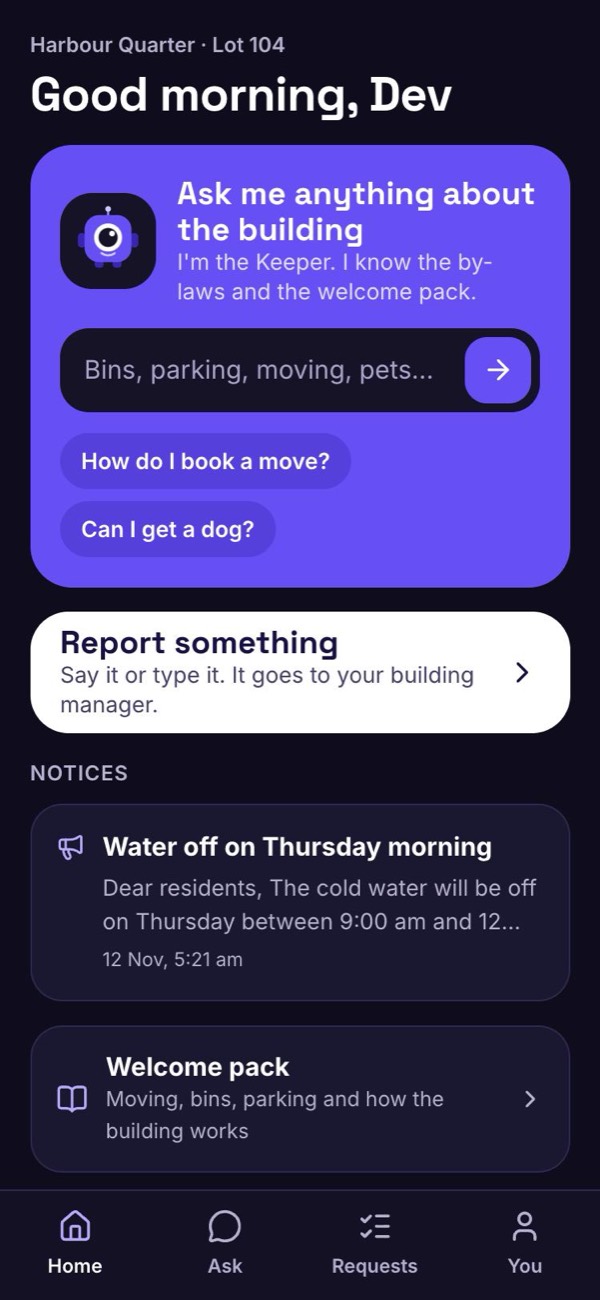
The answer, without waiting for office hours
Every building has a welcome pack and a set of by-laws that almost nobody can find when they need them. The Keeper has read your building's, and answers in plain words at any hour.
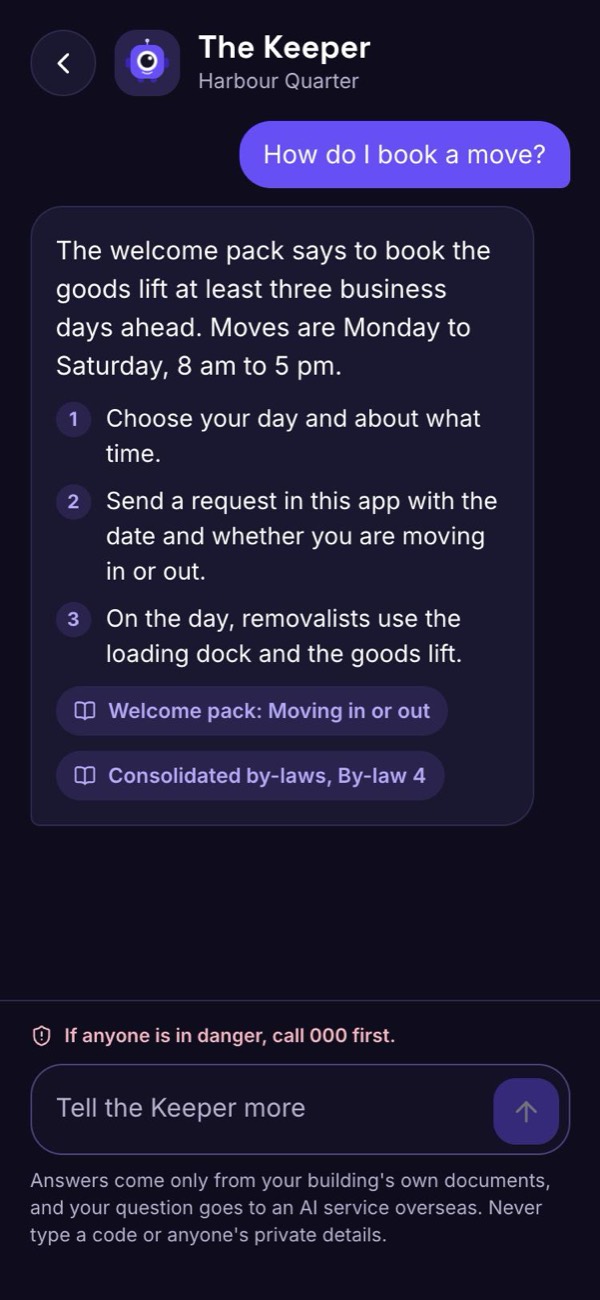
How do I book a move?
The welcome pack says to book the goods lift at least three business days ahead. Moves are Monday to Saturday, 8 am to 5 pm.
- Choose your day and about what time.
- Send a request in this app with the date and whether you are moving in or out.
- On the day, removalists use the loading dock and the goods lift.
Is there a bond for moving in?
Yes. The welcome pack says a refundable bond of $500 is paid to the owners corporation before your move is confirmed, by bank transfer, with your lot number as the reference.
It is returned once the lift and the common areas have been checked after your move. I can't take the payment, but I can send your move date to the building manager.
Can I get a dog?
By-law 6 is the one about keeping animals. It says you need to ask the owners corporation in writing before the animal arrives. If you rent, you also need your owner's consent.
I can't say what the answer will be. I can pass your request to the building manager.
Can I put my place on short-term rental?
By-law 21 covers short-term letting, and I can show you its words. It doesn't settle your situation, and I don't interpret by-laws.
That one is for your strata manager. Would you like me to pass the question on?
Water is coming through my ceiling
I have drafted a request for your building manager. Nothing is sent until you press Send it. If anyone is in danger, call 000 first.
Sample answers from a made-up building. In your building, the Keeper answers from your own welcome pack and by-laws, so the days, amounts and rules are yours.
An AI that has only read your building
The Keeper isn't a general chatbot guessing at an answer. It is given two things: the welcome pack your building wrote, and the by-laws on file. That is all it works from.
- It names its sourceEvery answer shows where it came from, such as "Welcome pack: Pets" or "By-law 6", so you can check it.
- It says when it doesn't knowIf your building's material doesn't cover the question, it tells you so and offers to pass it to your building manager.
- It quotes, it doesn't ruleThe Keeper tells you what a by-law says. It doesn't interpret it or give legal advice. Decisions stay with the people responsible for them.
Moving day, minus the runaround
Moving into an apartment building comes with rules nobody tells you until you break one. The Keeper walks you through your building's way of doing it.
Ask how it works here
Which days and hours, how much notice, where the removalists park and which lift to use.
Know about the bond
If your building asks for a moving bond, the Keeper tells you the amount and how to pay it, in your building's own words.
Send the booking request
The Keeper drafts it with your date. You press Send it, and it goes to your building manager to confirm.
Follow it
Your request shows where it stands, so you are not left wondering whether anyone saw it.
Straight up: the Keeper explains and prepares. It doesn't take payments, and a booking is confirmed by your building manager. A live bookings calendar is coming later.
Say it, type it, or tell Siri
A leak, a broken door, a light out in the car park. Report it in the way that suits the moment, and it goes straight to your building manager.
- Tell the KeeperDescribe it in your own words. The Keeper turns it into a tidy request and you press Send it.
- "Hey Siri, building report"On an iPhone, set it up once. After that you can report a problem without opening the app, and Siri reads back your reference.
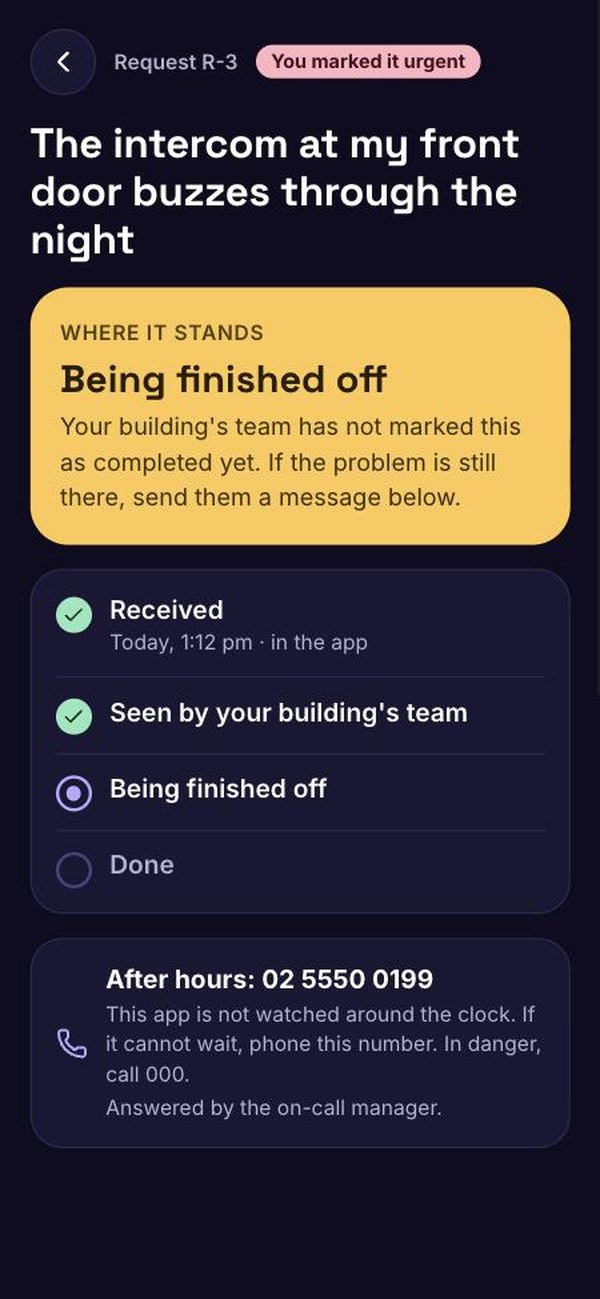
- Tick urgent if it isTick the urgent box and your building's team sees it marked that way. The app is not watched around the clock, so your building's after-hours number, when the building has one on record, is shown wherever you send a request.
If anyone is in danger, call 000 first. For something that can't wait after hours, such as a burst pipe or someone stuck in a lift, phone your building's after-hours number. A report in the app is not an emergency call.
YouHey Siri, building report
SiriWhat would you like to report?
YouThere's a leak in the corridor outside my door on level nine
SiriYour report for Harbour Quarter is received. Your reference is R 1. If anyone is in danger, call triple zero. This is not watched around the clock. If it cannot wait, phone the after-hours number.
No more "did anyone get my email?"
The moment you send a request you get a reference number. From then on, the request itself tells you where things are up to.
- Four plain stepsReceived. Seen by your building's team. Being looked into. Done. Each one shows only once it has really happened.
- Updates from the teamMessages from your building's team appear on the request, and you can write back if something changes.
- Building noticesWater off on Thursday, lift under service: your building's notices sit on the home screen.
Your home, your business
An app about where you live has to be careful. These are the rules the resident app is built on.
By invitation only
You get in through a private link from your building manager, tied to your own lot. The link works once. Nobody can sign themselves up to your building.
You see your own requests
Not your neighbour's, and they don't see yours. The Keeper is never given another resident's details.
No codes, ever
The Keeper is not given door codes, alarm codes or anything from the building's vault, so it can't hand them out.
Only your words
When you report through Siri, OB1 receives the words and keeps no recording. Siri turns speech into text on Apple's side.
Open about the AI
Your question is answered by an AI service overseas, and the app says so where you type. Never type a code or someone's private details.
It ends when you move out
When you leave the building, your access and your Siri set-up stop the same day.
Where the resident app stands today
The resident app is built and being tested on made-up sample buildings. No real residents are using it yet, and we are not promising dates.
- Joining by a one-time invitation from your building manager
- The Keeper, answering from the welcome pack and by-laws
- Reporting a problem by typing or speaking
- Reporting through Siri on an iPhone
- Adding photos to a request, up to six
- Following a request, with messages both ways
- Your building's after-hours number, shown wherever you send a request
- Alerts on your phone when a request moves, tried on one iPhone so far
- "Forgot your password?", with a one-time reset link
- The welcome pack and building notices
- Opening it to real residents, in pilot buildings first
- Invitations emailed to a whole building at once
- A live bookings calendar
- Reporting by voice on Android
- Adding a photo through Siri
- An app in the App Store
What it is not
It is not an emergency service and nobody watches it around the clock: in danger, call 000. It does not take payments or hold bonds. It does not give legal advice. And the Keeper is only as good as the welcome pack and by-laws your building gives it.
Questions
How do I get the resident app?
You can't download it yourself. It comes with your building: when a building runs on OB1, the building manager sends each resident a private invitation link. It is still in testing, so no buildings have it switched on for residents yet.
What if I forget my password?
Tap "Forgot your password?" on the sign-in screen. Your building manager is asked to send you a reset link. It works once, and your old password keeps working until you use it.
Is it in the App Store?
Not today. It opens in your phone's browser from your invitation, and you can add it to your home screen so it sits there like any other app.
Does it work on Android?
The app itself works in any modern phone browser. Reporting by voice through an assistant is iPhone and Siri only for now.
Can it book the lift or a room for me?
It tells you how booking works in your building and prepares the request for you to send. Your building manager confirms it. A calendar where you pick a slot yourself is coming later.
Can I pay my moving bond in the app?
No. If your building has a bond, the Keeper tells you how much it is and how your building wants it paid. The payment itself happens outside the app.
Who reads what I ask the Keeper?
Your question goes to an AI service overseas to be answered, which the app tells you where you type. A request you send goes to your building's management team. Other residents see none of it.
Want the Keeper in your building?
The resident app comes with OB1, which your building's management team runs. Send this page to your building manager or your committee. If you manage buildings yourself, the pilot is open to ten teams.